

New in CloudBees Smart Tests: High-failure-rate tests and Quarantine.
AI is writing more code every quarter, and the volume of change hitting your delivery pipeline has already multiplied. The bottleneck isn’t writing code anymore; it’s knowing whether what reaches production is safe to ship.
Every engineering team knows the ritual. The pipeline goes red: someone glances at the failure, recognizes the test name, and hits re-run. It passes the second time and work continues.
Nothing was broken or fixed, just a little more trust in the test suite eroded.
That ritual is getting more expensive. The pressure cascades downstream, into review, CI/testing, and release. The first thing that breaks under that pressure is your test suite.
Beyond any single failure, problematic tests reinforce a costly habit. Once a team learns that red doesn’t necessarily mean broken, red stops meaning anything at all; your test suite stops being a safety net and starts being a tax.
Today we’re shipping two capabilities in CloudBees Smart Tests that tackle this directly: the High failure rate tests page and Quarantine. Together, they do two things: identify the noise and remove its impact on CI.
Quarantine, defined: a quarantined test keeps running and recording results on every session, but its pass/fail no longer blocks your pipeline. Nothing is deleted, nothing is skipped, and when the test is healthy again, it comes back.
The problem isn’t flakiness. It’s what flakiness does to your team.
As a suite grows, a handful of tests start failing at a high rate, sometimes consistently, run after run. Sometimes unpredictably, in the way we’ve all agreed to call flaky. Often the cause has nothing to do with the code under test: it’s how the test was written, a timing assumption, a shared fixture, a dependency on infrastructure that isn’t always there.
The direct cost is easy to see: wasted CI minutes and developers babysitting pipelines instead of shipping. The indirect cost is worse: real regressions slip through the noise because nobody looks closely at a failure they’ve seen fifty times.
That is the real exposure. You cannot govern what reaches production if you cannot trust the signal telling you whether to ship.
Two instincts, and the option you actually need
When a test becomes a problem, two instincts take over: delete it, or live with it.
Deleting removes coverage you may still want, and it hides the problem instead of tracking it. Living with it means the noise compounds, because every problematic test left alone trains your team to ignore the pipeline a little more.
What you need is a third option between “this test blocks everyone” and “this test no longer exists”: set it aside explicitly, keep its history, and fix it on a reasonable timeline rather than as an emergency. Cloudbees Smart Tests now operates with this option in mind.
Step one: find out which tests are actually the problem
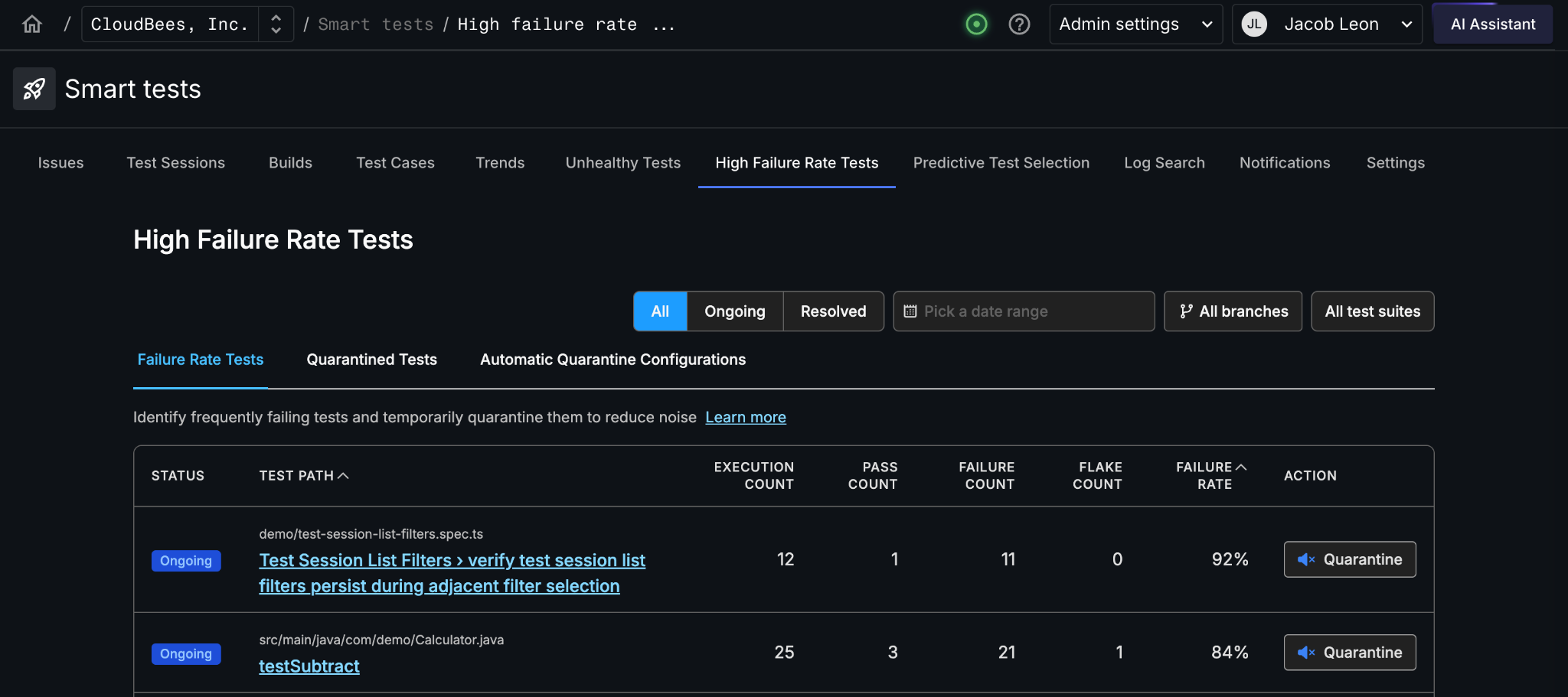
The High failure rate tests page lists every test that has failed over a time window you choose, along with the data you need to triage it: execution count, pass count, flake count, and failure rate.
That combination matters more than failure rate alone. A test running dozens of times a day at a 90% failure rate is doing real damage to your CI signal. A test that runs twice a week at the same rate is an annoyance. While the percentages are the same, they hold very different priorities, and you can only tell them apart when you see rate and volume side by side.
Each test also carries a status that reflects where it’s heading:
- Ongoing: the test has been failing and hasn’t passed since. It’s actively broken.
- Resolved: recent sessions are passing again. It may have recovered on its own, or a fix may have landed.
The result is a ranked, evidence-backed list of your worst offenders. No more relying on the one engineer who happens to remember which tests are “the flaky ones.”
Step two: take the noise out of your CI signal
Quarantine is that third option.
Without it, unblocking main means opening a PR to skip the test, justifying it to reviewers, and waiting on a merge. That’s a lot of ceremony and time, and it ends with the test gone from your suite. Quarantine replaces all of that with a single click, or with a threshold that handles it for you. You get the same immediate relief without the PR, and you keep the test.
The rest of the suite keeps giving you a signal you can trust while the problem test gets fixed on a reasonable timeline.
The test is set aside explicitly and visibly, with a record of when it happened and who did it.
There are two ways in:
- Manual quarantine gives you case-by-case control. You spot a test on the High failure rate tests page and quarantine it in a click. This is the right call when the decision requires human judgment: a test failing because of a known infrastructure issue, for instance, where touching the test would be the wrong fix.
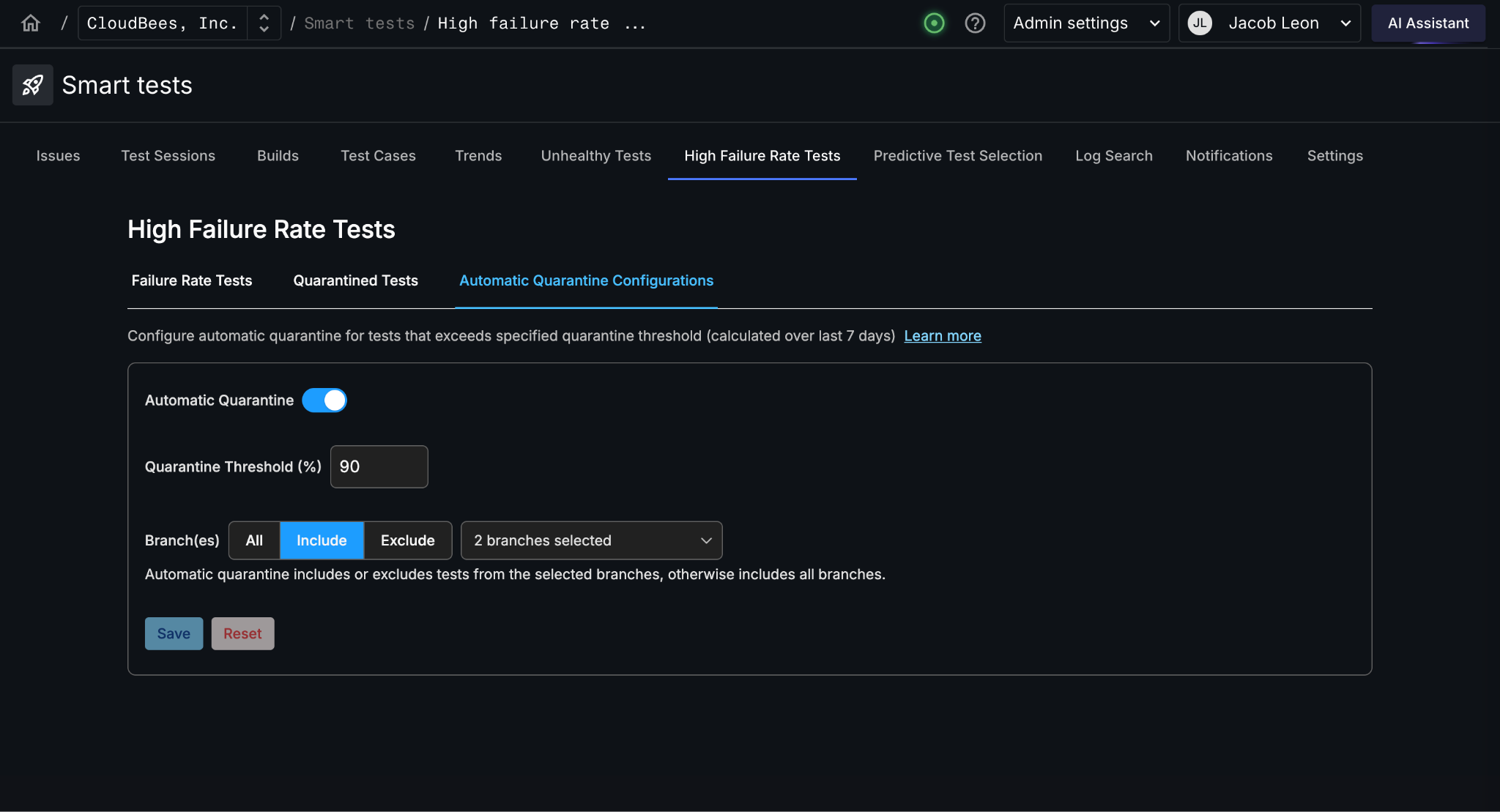
- Automatic quarantine is for teams that already know their suite has a noise problem and want to stop triaging it manually. Set a failure-rate threshold, and any test above it gets quarantined without intervention. It’s off by default; you opt in when you’re ready.
The part most teams get wrong: recovery
Setting tests aside is the easy half. The hard half is making sure they come back.
Plenty of teams have a “skip list” somewhere in their repo that started as a temporary measure three years ago. Tests go in. Nothing comes out. Coverage erodes, and nobody notices.
Quarantine closes that loop, and it works precisely because quarantined tests keep executing. We keep recording real pass/fail behavior the whole time a test is sidelined, which is how we know whether it’s still failing.
Tests that were automatically quarantined recover automatically once their failure rate falls back below your threshold. There is no cleanup task, and no risk of a fixed test staying sidelined because everyone forgot it was there. Manually quarantined tests recover manually, by design: you made the judgment call to set it aside, so you make the call to bring it back.
Built with teams living this problem
We designed and built this alongside a customer running a large, mature test suite where problematic tests were a daily drag on delivery. They knew their tests had lost credibility. They just had no central place to see which ones, and no way to contain the damage in the meantime.
Now the High failure rate tests page gives them a ranked list of suspects at any given time, and the quarantine list doubles as a working backlog: tests go on it with a named engineer attached, and come off it when the failure rate drops. Coverage stays intact. The pipeline signal is trustworthy again.
What a trustworthy signal is worth
Every engineering organization that scales with AI agents will meet this problem. More change volume means more pressure on CI, and the delivery system has to industrialize to keep up, not by adding more process but by making the signal reliable enough that you can actually govern what reaches production.
Run the right tests at the right time. Trust what the pipeline tells you. Ship with confidence.
If you’re maintaining a suite big enough that some tests have quietly become background noise, this is for you,. It’s available to every CloudBees Smart Tests user today.
This is one piece of the software factory we’re building, and the part that makes the signal trustworthy again.
A green build should mean your code works. Let’s get that back.

