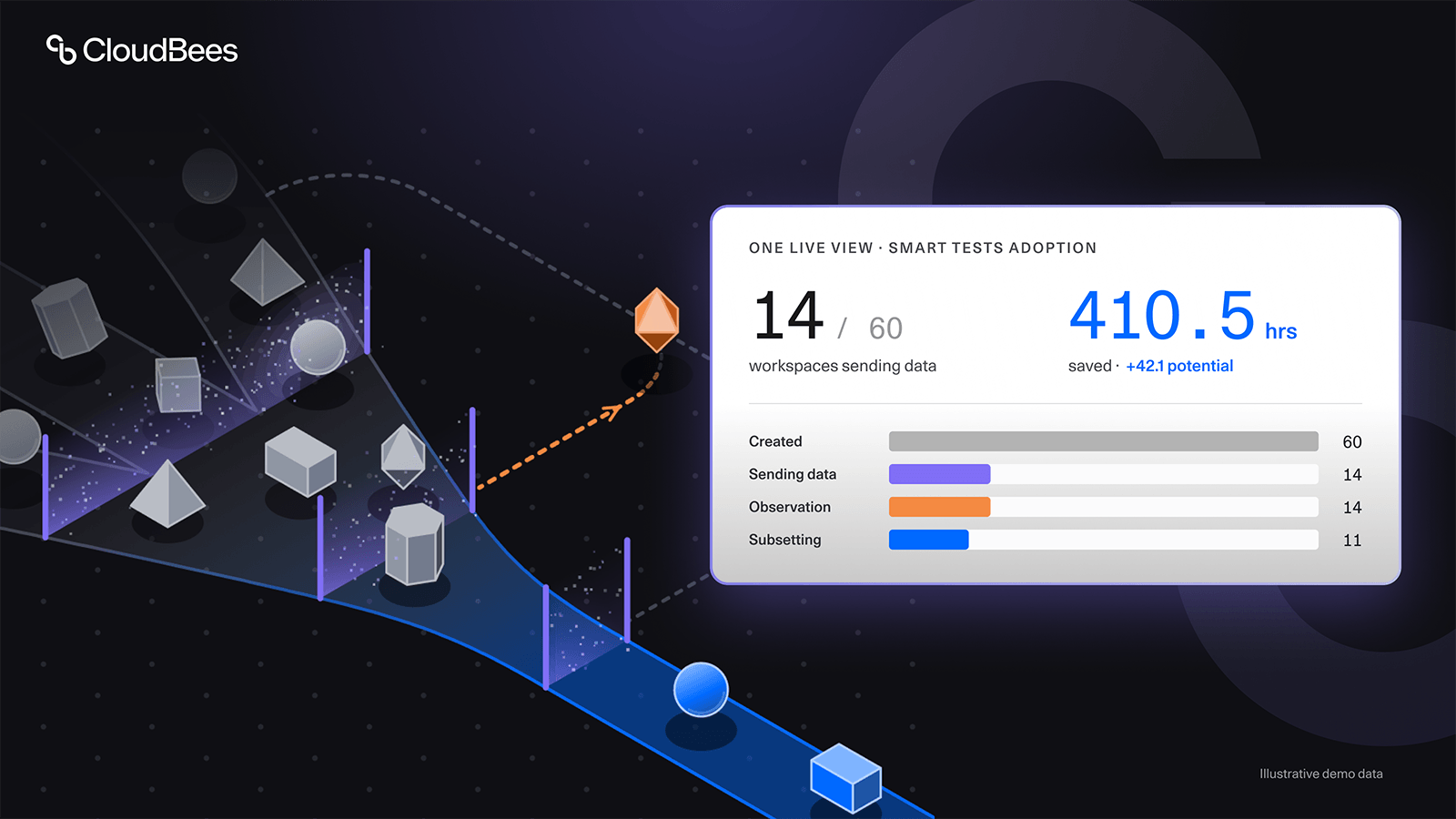
Who has actually adopted CloudBees Smart Tests, and how much time is it saving us? When you're onboarding hundreds of engineers across many teams, departments, and business units, that's the question every program lead eventually asks. At that scale, a rollout is a change-management project as much as a technical one. Teams move at different speeds, some hit friction earlier than others, and leadership needs a clear read on progress without chasing people down for status updates. Without that view, stalled teams stay invisible and the time savings leadership is counting on arrive later than planned.
For one large CloudBees Smart Tests customer, a global technology leader powering critical infrastructure for the travel industry, adoption tracking mostly happened by hand. Data were pulled manually from the backend and reported in slides, as a monthly report. If the customer's leadership wanted live numbers between reports, or a deeper look (where teams were in their rollout, how many were expected to finish onboarding in the next couple of weeks, how long it was taking a team to set up a workspace and start seeing value), they had no way to get them.
A monthly slide deck can't keep up with a rollout that size. When the customer’s leadership raised it in a regular check-in call, we built them a live adoption tracking dashboard on each workspace’s own Smart Tests telemetry, and they had the link in just under a week.
Instead of waiting for a monthly report, the rollout team and its leadership can now, whenever they need to:
- See at a glance how many workspaces have moved from created to sending data, running observation mode, or executing subsets.
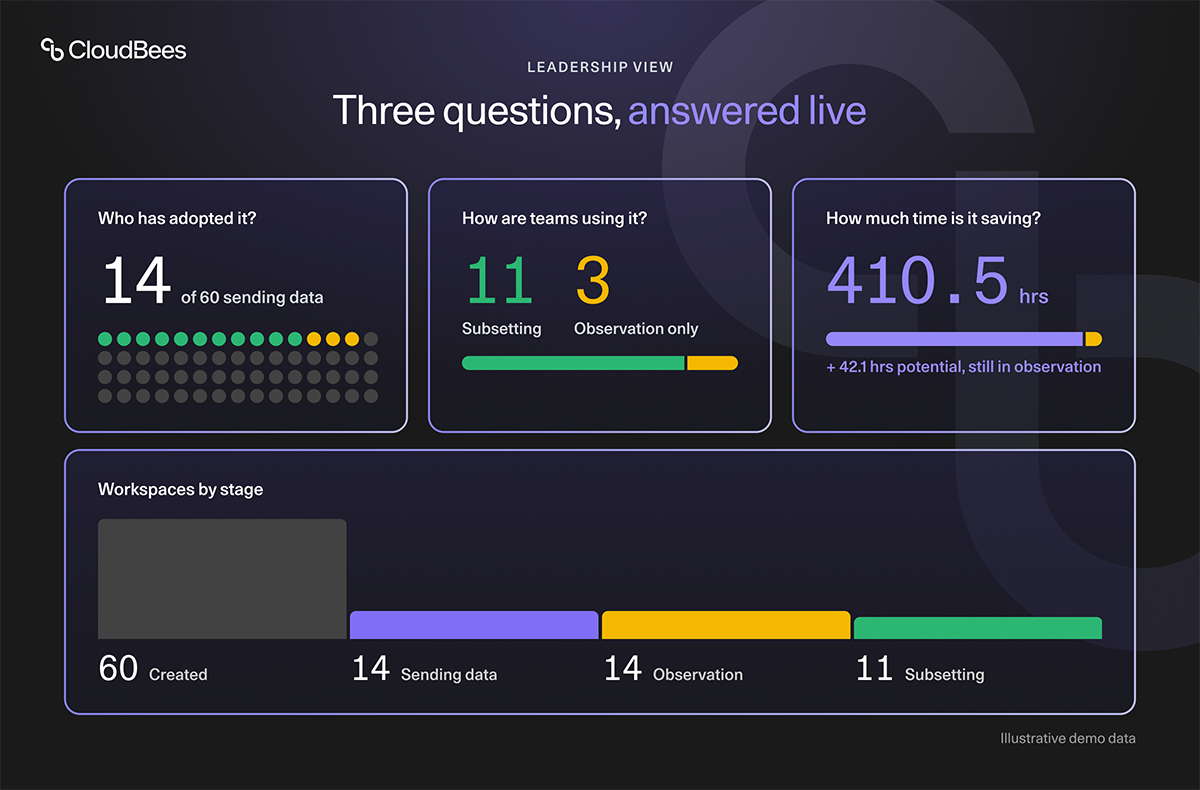
- Track engineering hours saved, both actual and potential, company-wide and by workspace.
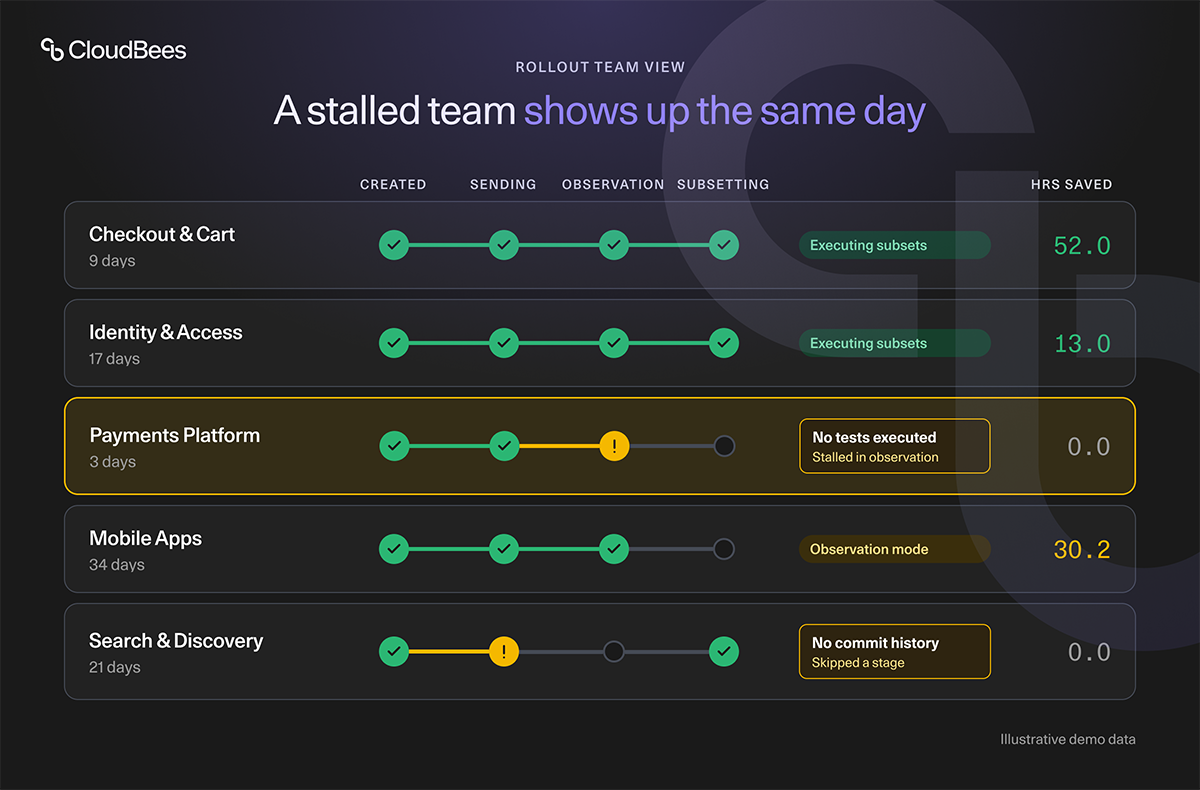
- Spot workspaces flagged with integration issues, such as no commit history or no executed tests, before they skew the adoption picture.
- Compare subsetting adoption against observation-only usage across the whole rollout.
- Drill from a company-wide Exec Summary into a per-workspace breakdown, sorted by how long each team has been adopting Smart Tests.
One view for leadership, one for the rollout team
The Exec Summary rolls the entire rollout up into a handful of signals leadership cares about: how adoption is trending across workspaces, how usage splits between subsetting and observation-only mode, and how much engineering time Smart Tests is giving back.
The Workspace Breakdown is for the teams closer to the rollout. It drills into each workspace: which stage it has reached, how long it's taken to get there, and whether anything is blocking it from getting full value out of Smart Tests. A workspace that needs attention, say one that hasn't executed any tests yet, surfaces automatically instead of waiting to be discovered.
The data is live every time you load the dashboard, and a manual refresh button pulls in the latest numbers.
How we built it
The customer’s leadership was clear on the goal: visibility into how the rollout was going. Our part was to define what adoption looks like in Smart Tests data, and which signals would show it.
So we broke it down into specific answers to "How is adoption going?": how many workspaces had been set up, how many were actually sending test data, which were already getting value from the product and which were still early in adoption, where each team sat across the onboarding stages, and how much time was being saved, actual and potential. Alongside that, we built a second view to go deeper into each workspace: whether it was already getting value, and how much time it was saving; how long the team took to complete onboarding; and if it hadn't yet, which onboarding stage it had reached and where, if anywhere, it was stuck.
Once it was clear what to build, AI helped us do the rest. We built it in a fast prototyping tool our team uses often: it connects to our data, lets us query it, and puts the results into ready-made interface components. With AI assistance, we turned those requirements into a working dashboard connected to the customer's Smart Tests data. After several rounds of iteration, we landed on a dashboard with the right metrics, tools to zoom in and out, the right layout, and an interface that explains itself.
We do this all the time, to test new ideas and to deliver feature requests. Smart Tests customers running large rollouts get a team that builds around their rollout, using their own data. This time it gave a customer's leadership the view into adoption progress they'd been asking for.
What made it work
Build with real customer data. A prototype with sample data explains the idea. A prototype with the customer’s own data shows them where their rollout actually stands. Leadership could react to real workspaces and real numbers from the first iteration, so their feedback was concrete, and each round brought the dashboard closer to what they needed day to day.
Help customers turn a goal into questions the data can answer. Our customer knew what they needed: confidence that the rollout was on track. Our job was to translate that into questions Smart Tests data could answer, such as “How many workspaces are sending test data?” and “Where is each team stuck?” Once the questions were clear, the dashboard followed.
Why CloudBees Smart Tests
The dashboard is a view on data Smart Tests already collects, which is what keeps it accurate without anyone maintaining it:
- Built on data Smart Tests already generates. No exports, no manual tagging, and no separate spreadsheet to keep in sync.
- Every stage, visible on its own. Each workspace's stage (created, sending data, observation, subsetting) is tracked separately, so stalled teams don't hide inside an aggregate adoption rate.
- Integration issues surface automatically. Program leads see which workspaces need a nudge, such as missing commit history or no executed tests, instead of finding out weeks into a stalled rollout.
Frequently asked questions
Can other Smart Tests customers get one?
Yes, on request. It isn't a self-serve feature in Smart Tests today. CloudBees builds it on your own Smart Tests data, and any Smart Tests customer can request one through their CloudBees account team or Professional Services contact. It's delivered separately from the Smart Tests dashboard in CloudBees Unify.
How current is the data?
Live every time you load the dashboard, with a manual refresh button to pull in the latest numbers.
Where does it run, and who can see it?
CloudBees hosts it as a separate web app, outside CloudBees Unify. Access is limited to the people your team names for the rollout and the CloudBees team supporting it.
What counts as an integration issue?
A workspace with no commit history, or one that hasn't executed any tests, is flagged so the rollout team can follow up.
See where your rollout stands
Who has actually adopted it, and how much time is it saving you? If you're rolling Smart Tests out across many teams, that answer shouldn't have to wait for a monthly report, and with CloudBees it doesn't have to.