The better test selection works, the harder it is to trust. A tool that skips most of your suite and never misses a failure looks exactly like a tool that's been lucky so far. Until you can see why it chose each test, "it's been fine" is the only evidence you've got.
That's why most QA engineers and developers still run their whole test suite on every change: it's the only way they know to be sure. As suites grow, that certainty costs more time on every build, and more of the code being tested is written by AI. In the 2026 State of Code Abundance report, 92% of leaders expressed confidence in the production readiness of AI-generated code, while 81% of enterprise leaders reported an increase in production issues tied to it. Confidence isn't the same as evidence, for code or for the tests that check it. Teams that run everything pay for it on every build, and teams that skip tests without evidence pay for it in production.
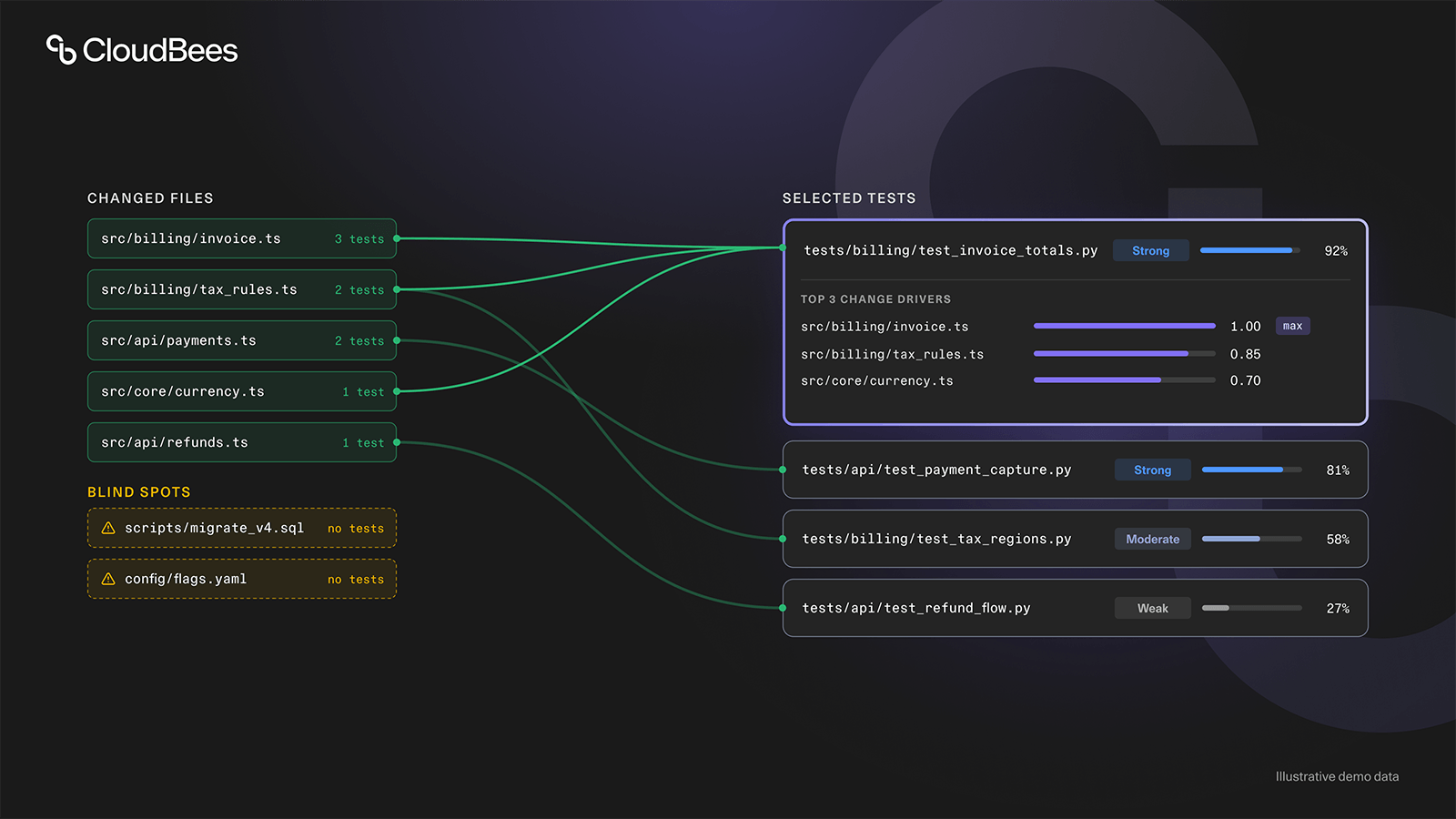
CloudBees Smart Tests gives teams that time back by running the tests most relevant to each change, a subset of your full suite, cutting test execution time by up to 80%. Now it also shows its reasoning. Every Predictive Test Selection decision traces back to the code changes that drove it, through three new views: a change summary, a relevance indicator, and a change driver breakdown. You get both the time savings and the evidence that the right tests ran.
With this release, teams using Predictive Test Selection can:
- Find the changed files that had no relevant tests.
- Tell why a test was selected, from the file behind it and its Strong, Moderate, or Weak rating.
- Check a surprising selection against the top three changes behind it.
- Validate the selected tests in Smart Tests, without switching between tools.
Know before you merge
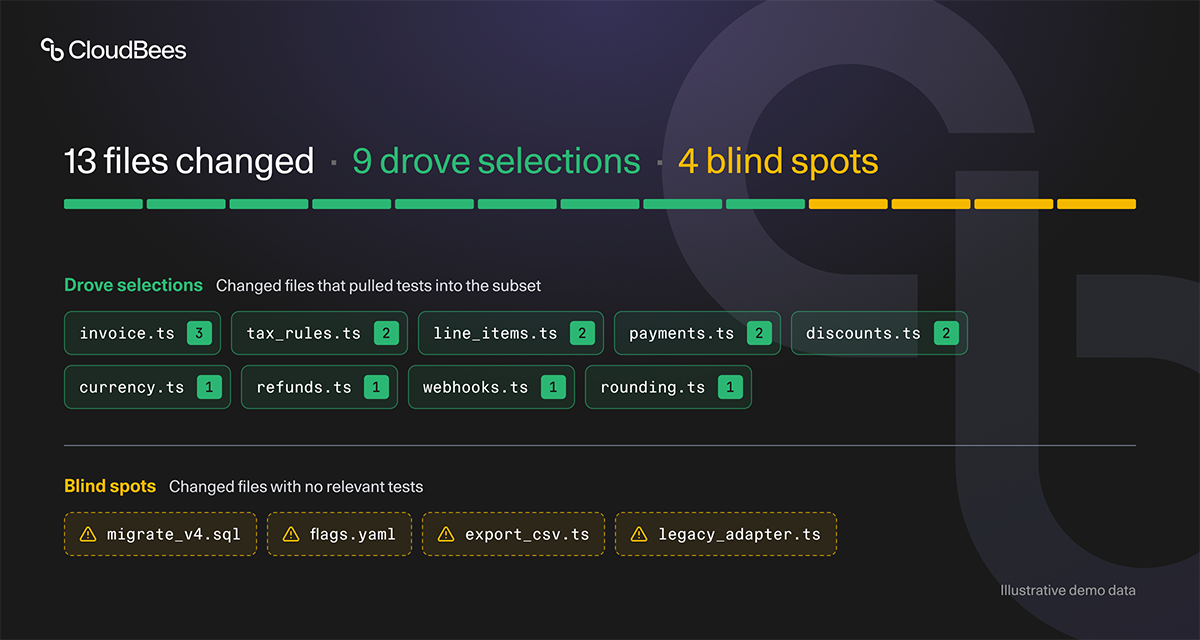
The change summary lists the changed files that drove your test selection, and the changed files with no relevant tests.
Check that second list first. It flags the parts of your change that nothing in your suite matched, so you can add tests or confirm coverage before you merge, not after something breaks. That gap is invisible when you only see a pass or fail.
Knowing what changed is half the answer. The other half is why each test made the list.
See why each test made the cut
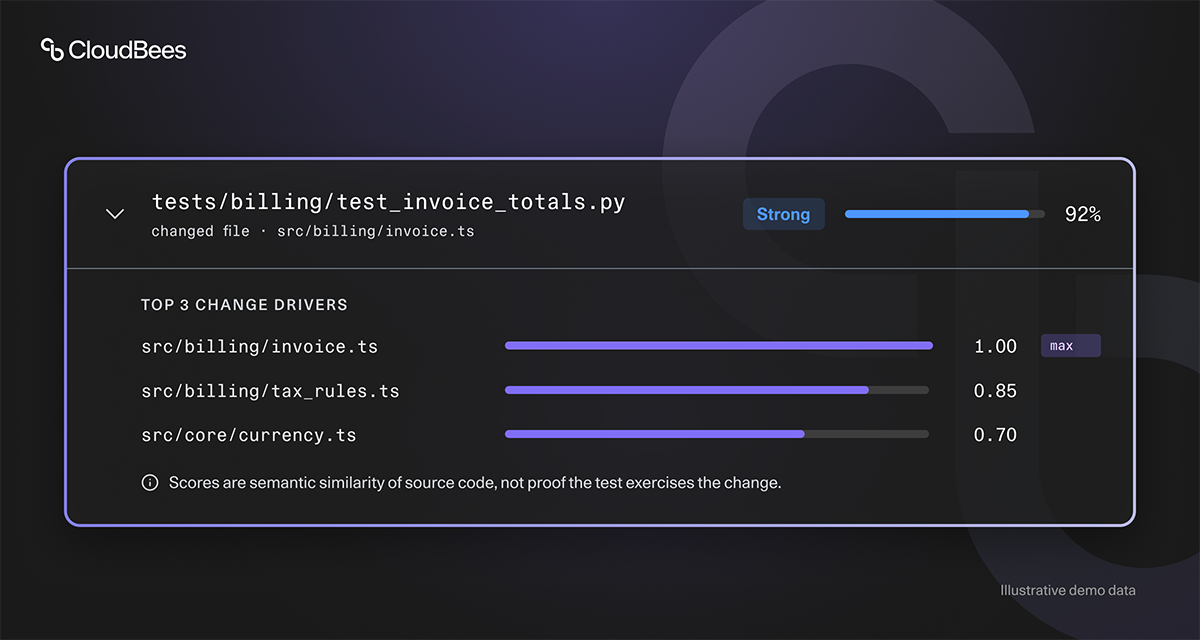
Before this release, each selected test came with a raw score. The relevance indicator replaces it with a Strong, Moderate, or Weak bar that names the file behind the selection.
When a selected test surprises you, expand it. The change driver breakdown shows the top three changes that drove its selection, so you can see whether a test was drawn in by one change or by several.
AI is a black box, and tracing exactly why it predicts the way it does can be tricky and often confusing. But it's a question our users ask every day when they look at a subset: were my changes properly validated, and why was a specific test I had in mind selected, or not? That's why we invested in building a reasoning system that closely traces how tests are ranked by similarity, and surfaces it in the app.
That ranking also sets the limit of the relevance indicator. CloudBees Smart Tests selection focuses on the semantic similarity between your changed code and your test code, and it currently doesn't depend on code coverage, so a Strong rating shows a close match to the change, not proof that a test runs the changed code.
Why CloudBees Smart Tests
Running every test on every change feels like the safe choice, and it's the one most teams make. Smart Tests still recommends a full run later in your pipeline, and changes what runs on every change before it:
- Up to 80% less test execution time. Each change runs the tests most relevant to it, not the whole suite. One DevOps test data management provider doubled its release velocity and saved 40,000 testing hours in one year.
- Reasoning you can check. Each selection now shows the changes behind it, so trusting the selection no longer rests on its track record alone.
- No changes to your test suite. Smart Tests doesn't replace or modify your tests, and needs no code instrumentation.
Frequently asked questions
Where do I see the reasoning?
On the Test Session Analyze and Build Details Subset Summary pages. If you already use Predictive Test Selection, it appears there for your test sessions.
Does this change how CloudBees Smart Tests selects tests?
No. This release adds the reasoning to pages you already use; the way tests are selected is unchanged.
Isn't skipping tests risky?
CloudBees Smart Tests selects the tests most relevant to each change, and the docs recommend running the full suite at some point later in your pipeline, and recording the outcome, to catch anything a subset doesn't. The change summary now also shows the changed files with no relevant tests, so you can see which parts of a change had no tests to run.
Is a Strong relevance indicator proof that a test covers my change?
No. It shows a close semantic match between the test and the change, not what the test executes.
Open your last test session
Test selection that works shouldn't have to look like luck. With CloudBees Smart Tests, the time savings and the reasoning behind them sit in the same place. Open the Analyze page for your last test session and check its reasoning for yourself.
To learn how selection works, refer to How CloudBees Smart Tests selects tests; for the full details, refer to the October 2026 release notes.